Tuesday, August 14, 2012

Native Minibloq for Linux released!

Minibloq for Linux was mainly the work of Juan Pizarro, from doingIT, an open source company from Chile. Many thanks Juan! You can download it by clicking on the above image, or go to the Downloads page.
Also, it may be convenient reading the changelog here. We also updated the documentation to explain how to (easily) run Minibloq under Linux.

Multiple-OS version!
This is not just a native Linux version. Now, by downloading one single distribution, you can run natively under different flavors of Linux AND under Windows (you just need to run MinibloqRun.sh in Linux, or MinibloqRun.exe in Windows). Also, this all-in-one package was designed to include all the necessary dependencies (but it's a Beta, so please tell us if you find problems, thanks!). We want to add support for Mac OS X in the future too (help with this task will very welcome...)

Minibloq UpdatePack-2 also released!
And, if you are a Windows user, this version also includes the UpdatePack-2, with the new language packages sent by users (Portuguese, Simplified Chinese and Romanian, plus a partial translation to Italian). If you don't want all the extra Linux stuff, you can download the Windows installer version. So now Minibloq runs in more OSs, and with more language options! Of course, we are always looking for more contributors and translators...

Upcoming v0.82.Beta version
Now we are focused on the next version: the v0.82.Beta. It will take some time, but it will support the adding of third party hardware, among other important features. Plus, we will release the code in a public repository. Right now, everybody can ask for the sources by posting on this  forum thread (we did not released the source code yet because it's still highly hardcoded and because we will also release soon an all-in-one  version of Code::Blocks including all the necessary dependencies to complie Minibloq with a few clicks). More on this soon...

Monday, August 6, 2012

Minibloq translated to Portuguese!


Minibloq has been translated to Portuguese! We want to say thanks to Marco André Ferreira Dias and Anderson Amador Silva from Brazil for their great contribution to the project. The complete translation (including tooltips) will be deployed along with the upcoming UpdatePack-2. We want to take this opportunity to ask for help with more translations. There are currently works in progress to translate Minibloq to  Italian and to Hebrew (but the tooltips for both languages are not finished and yes, we need some volunteers to translate them). Of course, any other translation will be very welcome. All the names of the people who is helping with the project are mentioned in the Credits webpage. By now, here is a screenshot showing the work of Marco Andrés and Anderson Amador:


Monday, July 23, 2012

Minibloq translated to Simplified Chinese!

We want to say thanks to Rodolfo Cossovich and Zhao Qian, from RobotGroup Shanghai (now Multiplo LLC), for the complete translation (including blocks tooltips) to Simplified Chinese:
We are always looking for help with translations, to make Minibloq accesible to more people.

Sunday, July 22, 2012

Cloud IDEs for Arduino

In the last few weeks, two interesting projects has been published, both aimed to program Arduino compatible hardware from Internet, without installation. We think both cloud and native solutions have their pros and cons, but more options are good for the users, so we wanted to mention these environments here. The firstone is codebender. They have given us the possibility of testing it, and it works nicely:


The other one is Wifino, a project that also include a new board, but sadly we could not test it yet.

Thursday, July 12, 2012

Minibloq translation to Romanian finished (thanks Petru)!

The Romanian translation has been finished! We want to say thanks to  Petru Isan  for this great contribution to the project. A partial translation to Romanian was included with the UpdatePack-1. But now, this translation has been finished (including the blocks tooltips), and it will be included along with the next UpdatePack. Here is a screenshot:

Sunday, July 8, 2012

Minibloq+Multiplo en la Provincia de Entre Ríos, Argentina

Hace dos semanas, en ocasión de la Semana de la Ciencia, fuimos invitados por la Dirección de Educación Superior de la Provincia de Entre Ríos, Argentina para hablar de enseñanza tecnológica con Multiplo y Minibloq en las ciudades de Paraná y de Crespo. Allí estuvimos junto a Mónica Paves, Directora de RobotGroup:

Sunday, July 1, 2012

Minibloq v0.81.Beta UpdatePack-1 is here!

As promised, the UpdatePack-1 (UP1 for short) is available now. And it's the result of the constributions of many users (thanks again!). Aside from minor bug fixes (all of them related to the new internationalization subsystem), it includes the following 5 complete language packages (by complete we mean that both the GUI and the blocks tooltips has been translated): French, German, Dutch, Catalan and Galician. We also decided to add 2 partial translations: Romanian and Hebrew. Of course, we still need help to get Minibloq translated to other languages, or to complete the partial translations. Revisions on the current translations are also welcome (we may have bugs, since all this is new...)
Here is a small screen capture from the Properties window (View->Properties menu) once the UP1 is installed:
To get and install the UP1, please these steps (here we are using Windows 7, but it should be even simpler in other Windows versions):
  1. Donwload the UpdatePack-1 from here.
  2. Now you have to decompress it inside your current Minibloq.v0.81.Beta installation path as shown in the images below:


  3. Now the operating system will ask if you want to replace the files with the same name: please just say Yes:
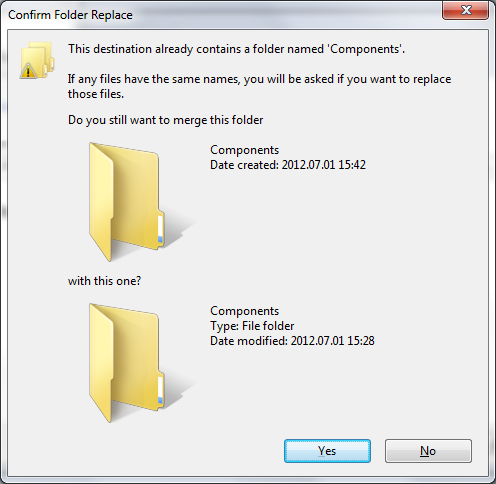
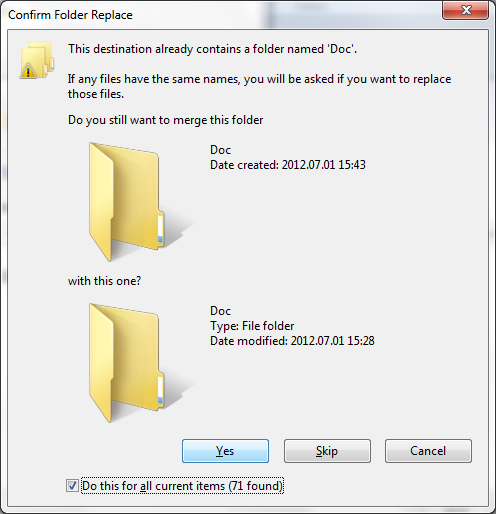
  4. And again, the OS will ask something (this time, if you want to merge some folders with the same name). And again: please say Yes:
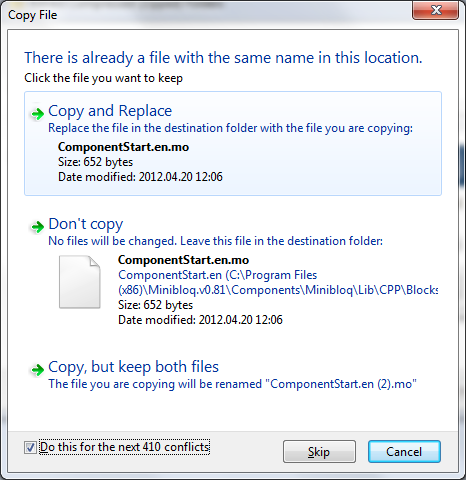
  5. And yes: once again, the OS will ask if you are sure to replace some files. And once again, please press Copy and Replace:
  6. And finally, the OS will ask to you for administrator permission. Please press the  Continue button:
Finally, please remember that if you have any question or idea about internationalization, you can always post to this forum thread.